# nas
-
- 1 commentaire
- 3394 vues
-
- 1 commentaire
- 1559 vues
-
- linea 3000
- bticino
- visiophone
- interphone
-
Étiqueté avec :
- 4 commentaires
- 1851 vues
-
- 9 commentaires
- 1418 vues
-
- 16 commentaires
- 4204 vues
-
- 1 commentaire
- 1283 vues
-
- 1 commentaire
- 1464 vues
-
- nas
- synology
- openvpn
- vpn server
-
Étiqueté avec :
- 7 commentaires
- 1977 vues
-
- nas
- synology
- download
- avertissement
-
Étiqueté avec :
- 10 commentaires
- 4425 vues
-
- 5 commentaires
- 9319 vues
-
- 4 commentaires
- 2535 vues
-
- 2 commentaires
- 2408 vues
-
- 6 commentaires
- 1772 vues
-
- 7 commentaires
- 3421 vues


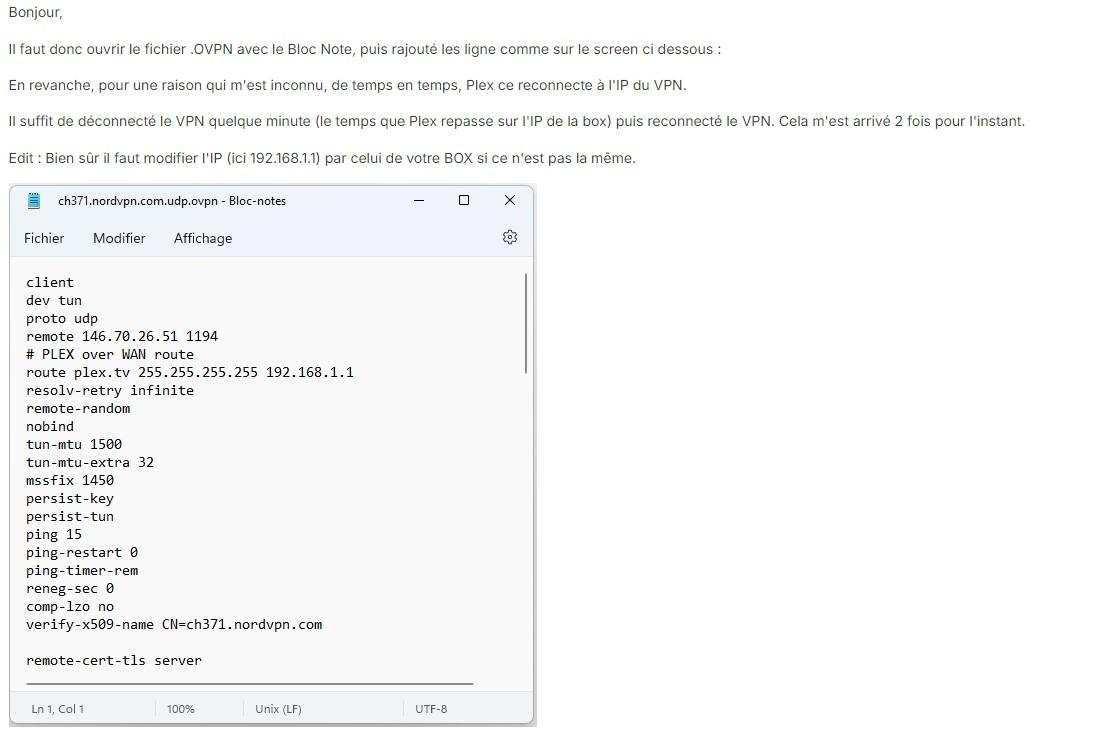




![[VENDU] NAS Synology ds718+ 10 Go 2.5G 2 x 6To WD Red Pro](https://www.nas-forum.com/forum/uploads/monthly_2024_01/2024-01-20-162938-293A2906.jpg.49a8f363877ca5b5886999a069e19f7b.jpg)












![[Résolu]Configuration perdue après un changement de disque](https://www.nas-forum.com/forum/uploads/monthly_2020_12/capture_12182020_085912.jpg.53dc2ba1f5f7e5a6835fb5b4814dc62b.jpg)